EZGlassPattern · Free pattern generator
Free stained glass pattern generator
Drop a photo and get a real pattern: numbered pieces with shared lines, checked for cutting at the size you'll build it, ready to print full size.
Updated
Photos never leave your device. The check runs in your browser.
Answer in 30 seconds
A stained glass pattern generator turns a photo into a line drawing of real, numbered glass pieces that can be scored, broken and fitted. A "stained glass effect" filter only makes a picture that looks like glass, with shapes no one could cut. EZGlassPattern generates the pattern, checks every piece at your finished size, and offers one-click fixes.
- Free to try: the generated preview, the cut check and the difficulty score cost nothing and need no account.
- Real pieces: every line is shared by two pieces and runs edge to edge, so the pattern closes and can be cut out.
- Your size, your method: pieces are checked at the finished width, after the copper foil (about 1 mm) or lead came (about 2 mm) line.
- Print-ready: a tiled 1:1 PDF, numbered key, colour key, shopping list and an SVG for Cricut.
Pattern generator, effect filter or drawing by hand
| Pattern generator (EZGlassPattern) | AI stained glass effect or filter | Drawing it yourself | |
|---|---|---|---|
| What you get | A numbered line pattern of real pieces | A picture that looks like stained glass | A line pattern |
| Can every piece be cut? | Checked automatically at your size, with fixes | Not designed to be cut | Up to you to check |
| Pieces share one line | Yes, so the pattern closes | No | If you draw it that way |
| Full-size print | Tiled 1:1 PDF with a scale square | No | Needs resizing and tiling |
| Glass and foil amounts | Shopping list per colour | No | Work it out by hand |
| Time | Minutes | Seconds | Hours |
Key takeaways
- Generator, not filter — you get a pattern you can cut, not a picture of glass.
- Fewer pieces cut better — start with 30 to 60 pieces for a first project; you can go up to 150.
- The cut check is built in — sharp inside corners, deep curves, slivers and crowded junctions are flagged before you print.
- Works anywhere — Mac, Windows, iPad or Chromebook, in the browser, with nothing to install.
- Private by design — Your photo never leaves your device: the whole check runs in your browser.
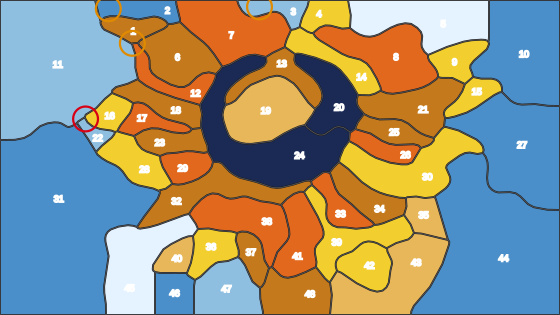
What makes a generated pattern cuttable
Glass breaks along a score that runs from one edge to the other, and it prefers straight lines and gentle outside curves. A generator that just traces colour regions will happily make shapes glass can't do: notches, deep bays, hairline slivers, pieces trapped inside other pieces.
EZGlassPattern simplifies the photo into large, mostly convex pieces, makes neighbouring pieces share one line, then runs the same cut check you'd use on a bought pattern. Anything it flags comes with a fix: add a break line, merge a sliver into its neighbour, or trim a corner.
What you can make with it
- Pet portraits from a clear photo of one animal. See pet stained glass patterns.
- Memorial pieces of a person, pet or place. See memorial patterns.
- Flowers, birds and landscapes with one clear subject and good light.
- Suncatchers and panels from a few inches up to a full window, in copper foil or lead came.
- Cricut and plotter projects from the SVG export. See patterns for Cricut.
How the generator works
Your photo is read in the browser, never uploaded. Colours are grouped into a small glass palette, nearby areas are merged until the piece count you chose is reached, and small specks are folded into their neighbours. The outlines become one shared network of lines, so every piece fits against the next.
Then each piece is measured at your finished size, after the foil or lead takes its share of the line. The full walk-through, with photo tips, is in how to make a stained glass pattern from a picture.
Step by step
- 1
Drop a photo
Drop a JPG, PNG or WebP into the generator. It is processed in your browser.
- 2
Set the size and method
Enter the finished width in inches or centimetres and choose copper foil or lead came.
- 3
Pick a piece count
Choose Beginner, Intermediate or Advanced, or any count from 20 to 150.
- 4
Fix what's flagged
Apply the one-click fixes for pieces that can't be cut, or adjust by hand.
- 5
Print it full size
Download the tiled 1:1 PDF, check the scale square, and print at 100%.
Frequently asked questions
Is there a free stained glass pattern generator online?
Yes. EZGlassPattern generates a pattern from your photo in the browser for free, with the cut check and difficulty score included and no account. The printable packet is $5 for a 30-day pass, or Lifetime.
Can it make a pattern from my own photo?
Yes. Any JPG, PNG or WebP works. One clear subject, good light and a plain background give the best patterns.
What is the difference between a pattern generator and an AI stained glass effect?
An effect makes an image that looks like stained glass. A pattern generator makes the line drawing you cut from: closed, numbered pieces sized for real glass. Effects are not meant to be built.
How many pieces should a generated pattern have?
For a first project, 30 to 60 pieces on a panel about 12 inches wide. More pieces show more detail but take longer and need more careful cutting. You can choose anywhere from 20 to 150.
Does it work on Mac and iPad?
Yes. It runs in the browser on Mac, Windows, iPad and Chromebook, with nothing to install.
Can I export an SVG for Cricut?
Yes. The pattern packet includes an SVG of the cut lines alongside the full-size PDF.
The check is free. Pay once when you print.
No account and no card for the cut check. A Project Pass is $5 one-time for 30 days of printable pattern packets, with no subscription. Lifetime covers everything, forever.
Related
- Make a stained glass pattern from a photoPhoto to pattern: choose a piece count, set the real size, fix flagged pieces, and print a full-size pattern.
- Is my stained glass pattern cuttable?The free checker: drop a pattern and see which pieces can't be cut at your finished size, with one-click fixes.
- A stained glass pattern of your dog or catDog and cat portraits: a pattern from your pet's photo, simplified for glass and checked for cutting.
- What makes a stained glass pattern good for beginners?What makes a pattern beginner-friendly, a checklist, and a free difficulty check for any pattern.
- How do I make a stained glass pattern from a picture?Step by step from a photo to a cuttable, printable stained glass pattern, by hand or with a tool.
- A stained glass pattern SVG for your CricutSVG export for Cricut and plotters: cut paper templates for a pattern already checked for glass cutting.